
Lootable Boxes
[META]
TITLE: Lootables 2.0
CATEGORY: Gameplay, Looting
COMPATIBILITY: ESX, QBCore, QBox
SETUP: Easy Setup
PERFORMANCE: Optimized
STATUS: Actively Maintained
BADGE: UPDATED
[/META]
[SUMMARY]
Database-driven lootable box system with an in-game 3D gizmo editor. Place, configure and manage crates, safes and shipping containers without config files or server restarts.
[/SUMMARY]
[FRAMEWORKS]ESX,QBCore,QBox[/FRAMEWORKS]
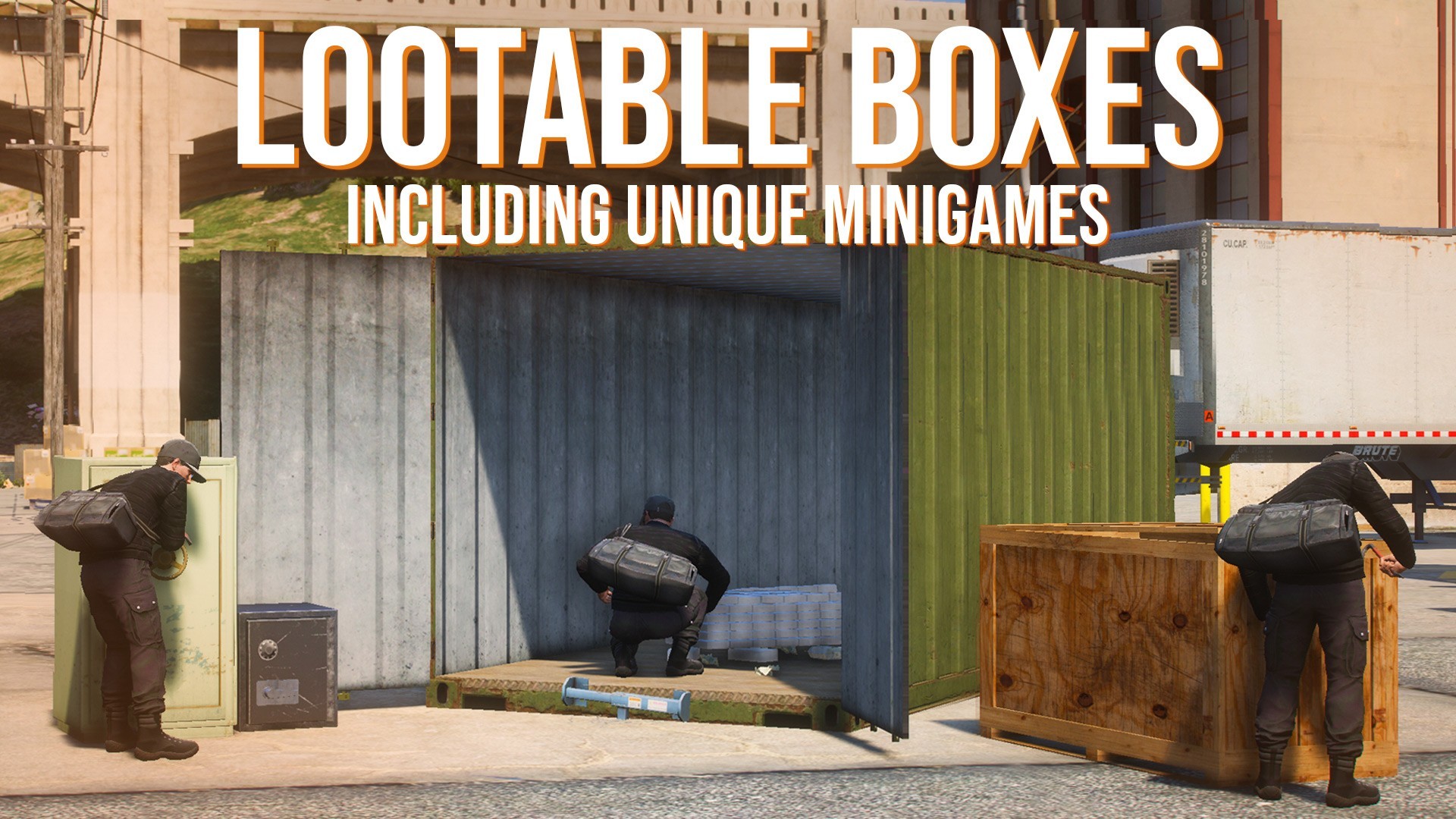
Lootables 2.0 — A database-driven lootable box system with an in-game 3D gizmo editor. Place crates, safes and shipping containers anywhere on the map, wire up your own loot tables and requirements, and manage everything live from the admin UI — no JSON files, no restarts.
Admins use the gizmo editor to place and rotate boxes in the world with live visual feedback. Loot pools, required items, required weapons, reset cooldowns and named export bindings are all edited through dedicated in-game panels (`/lootables`, `/items`, `/metadata`, `/exportlootable`). Changes are saved to MySQL through the UI.
Players open boxes through one of three synchronized minigames — rapid A/D alternation to smash crate lids, a 3-number dial for safes, or a 15-second thermite burn for shipping containers. Loot is rolled server-side and picked up one item at a time; when one player grabs an item, it disappears for everyone. Police-count gates and optional dispatch alerts (built-in or external) add server-side pressure to every open.
[FEATURES]Database-driven configuration with zero server restarts required|Interactive 3D gizmo editor — translate (W), rotate (R), snap-to-ground (Left Alt), shift-drag clone, freecam|Four box types across three synchronized minigames — A/D alternation (crates), 3-number dial (safes), 15s thermite burn (shipping containers)|Live, multi-entity placement with drop-prop positioning per loot item|Lootables Editor UI (/lootables) — edit loot pools, required items, required weapons, reset cooldown and display name|Items Management UI (/items) — item catalog with categories, default min/max/chance, inventory prop and metadata|Metadata Fields Manager (/metadata) — define your own metadata fields (string / number / boolean) and attach them to items|Export Management UI (/exportlootable) — turn any placed box into a named export with copy-to-clipboard code snippets|Server exports: SpawnLootable, DeleteLootable, ResetLootable — spawn lootables from other scripts for heists and dynamic events|Client callback: RegisterOnPlayerSuccessCallback for post-open hooks|Bulk actions on existing lootables (enable / disable / delete / go-to)|Per-box reset cooldowns — independent re-loot timer per placement|Police gate — minimum online cops before a box can be opened, with optional player notification|Dispatch integration — built-in blip dispatch plus ps-dispatch, cd-dispatch, core-dispatch (old & new), with configurable chance and event name|Automatic framework, inventory and target detection via kq_link (ESX, QBCore, QBox; ox_target, qtarget, qb-target)|Extensible box types — add your own models, sub-types and minigame bindings in Config.boxTypes|Invisible-box option — attach lootability to existing world props via alpha override|ACE-permission gated admin (lootables.admin, configurable)|Automatic SQL migration and schema validation on first start|Locale files for server, client and UI strings|Optimized: 0.00–0.01 ms idle, per-box stream distance, GlobalState sync, built-in entity garbage collector[/FEATURES]
[REQUIREMENTS]ESX, QBCore or QBox framework|mysql-async or oxmysql|kq_link (framework / inventory / target bridge)[/REQUIREMENTS]
[FAQ]How do I place boxes?::Use the /placebox command in-game. The 3D gizmo editor lets you position and rotate the box with live preview, then save it straight to the database — no restart required.|Do I need to restart my server when I change boxes or loot?::No. All edits go through the admin UIs (/lootables, /items, /metadata, /exportlootable) and persist to MySQL immediately.|Can I set different loot for each box?::Yes. Every box has its own independent loot pool, with per-item chance, min/max amounts and optional custom drop props that are positioned in-world via the gizmo.|Do boxes respawn after being looted?::Yes. Each box has its own configurable reset cooldown that fully restores its loot once the timer expires.|Can I require items or weapons to open a box?::Yes. Every box supports required items and required weapons lists. Required items can be optionally consumed on successful open (global toggle).|Can other scripts spawn lootables for heists or events?::Yes. Any placed box can be turned into a named export via /exportlootable, then spawned, reset or deleted from your own scripts with the SpawnLootable / ResetLootable / DeleteLootable server exports.|Does this work with my framework?::The script auto-detects ESX, QBCore and QBox via kq_link. Inventory and targeting systems (ox_target, qtarget, qb-target) are detected the same way. Bridge files for items, money, police and SQL are included and fully editable for custom setups.[/FAQ]